To find the right Consumables for your Printer use the search below with your Printer Model or Cartridge Part # .
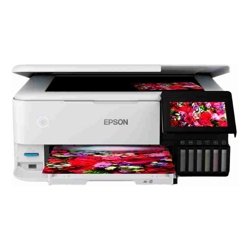 Product may vary from image. Rely only on description for purchasing decisions.



Featuring 6-colour inks, the EcoTank Photo ET-8500 wireless all-in-one offers revolutionary cartridge-free printing with easy-to-fill ink tanks. It comes with enough ink in the box to print 1000s of pages equivalent to about 100 individual cartridges. That’s an incredible amount of ink — enough to print documents up to 4,900 pages, or 1,800 photos (4" x 6"). Plus, it features Epson® exclusive auto-stop ink Claria ET Premium bottles, with each colour uniquely keyed for easy filling of each tank. The ET-8500 also prints borderless up to A4 and includes paper and photo trays, plus built-in USB/card slots.
Highlights
Features
The compact and stylish EcoTank Photo ET-8500 has all the functions you need for photos, documents and more. Create lab quality borderless 4" x 6" photos in 15 seconds, plus editing them is fast and simple with our Automatic Photo Correction and red-eye removal tool. Customise creative projects or archive special moments with the dedicated CDs/DVDs tray for direct printing.
The EcoTank Photo ET-8500 supports the latest wireless standard, 802.11b/g/n, it also includes Wi-Fi Direct®, which means no router is required, providing users with greater coverage and faster speeds. You can use your EcoTank printer from anywhere in your home and share it with multiple PCs.
Built in Ethernet makes sharing the printer on your network quick and easy.
Users can easily print from their tablet or smartphone using Epson Connect™ solutions. Supports Android™, AirPrint™, iPad and iPhone, Chromebook™, Fire™-OS, Mac®, and Windows® devices. Wirelessly print a range of documents, reports, invoices, presentations and so much more whether at the home office or on the go. You can also scan documents and save them to the cloud for easy access and collaboration.
Apple® AirPrint™ makes it simple to print photos, emails, web pages, presentations and documents straight from their iPad or iPhone. There's no software to download, no drivers to install and no cables to connect. Your Apple® IOS® device will automatically connect to the printer.
Navigating the printer menu is easier than ever with the 4.3" colour display and the user friendly control panel buttons, making printing of documents, reports, invoices and presentations so much easier whether at home office or on the go.
Get high-quality colour or black-and-white copies in a snap.
 Print Epson EcoTank ET-8500 A4 Colour Multifunction Inkjet Printer Print Copy & Scan Wireless Printing 6-colour Claria ET Premium Ink Product Page
 Ask Us About Epson EcoTank ET-8500 A4 Colour Multifunction Inkjet Printer Print Copy & Scan Wireless Printing 6-colour Claria ET Premium Ink
 Price Match Epson EcoTank ET-8500 A4 Colour Multifunction Inkjet Printer Print Copy & Scan Wireless Printing 6-colour Claria ET Premium Ink